Rift for VS Code
The extension lists the differences of two large files in a side view and opens each one in VS Code's own diff editor. VS Code never loads the files.
Install
Install from the Marketplace Install from Open VSX
Or from a terminal:
code --install-extension rubtsov-stan.rift-diff
The packages for macOS and Linux, on arm64 and x86_64, carry their own rift binary, so you install nothing else. On another platform, install rift yourself and point rift.path at it. Windows is not supported. The extension needs VS Code 1.100 or later.
The extension starts one rift serve process per window and talks to it over standard input and output. It opens no network connections and sends no telemetry.
Compare two files
Run Rift: Compare Files… from the command palette. It asks for file A, starting in the folder of the file you have open, then for file B.
In the Explorer, select two files (Cmd-click or Ctrl-click the second) and choose Compare with Rift from the context menu. The entry shows only when two files are selected.
One comparison is open at a time, and starting a new one closes the last. Rift: Close Comparison, or the close button at the top of the view, closes it without starting another.
The Rift view
The Rift icon in the activity bar opens the view. Its header names the pair: a.sql ↔ b.sql.
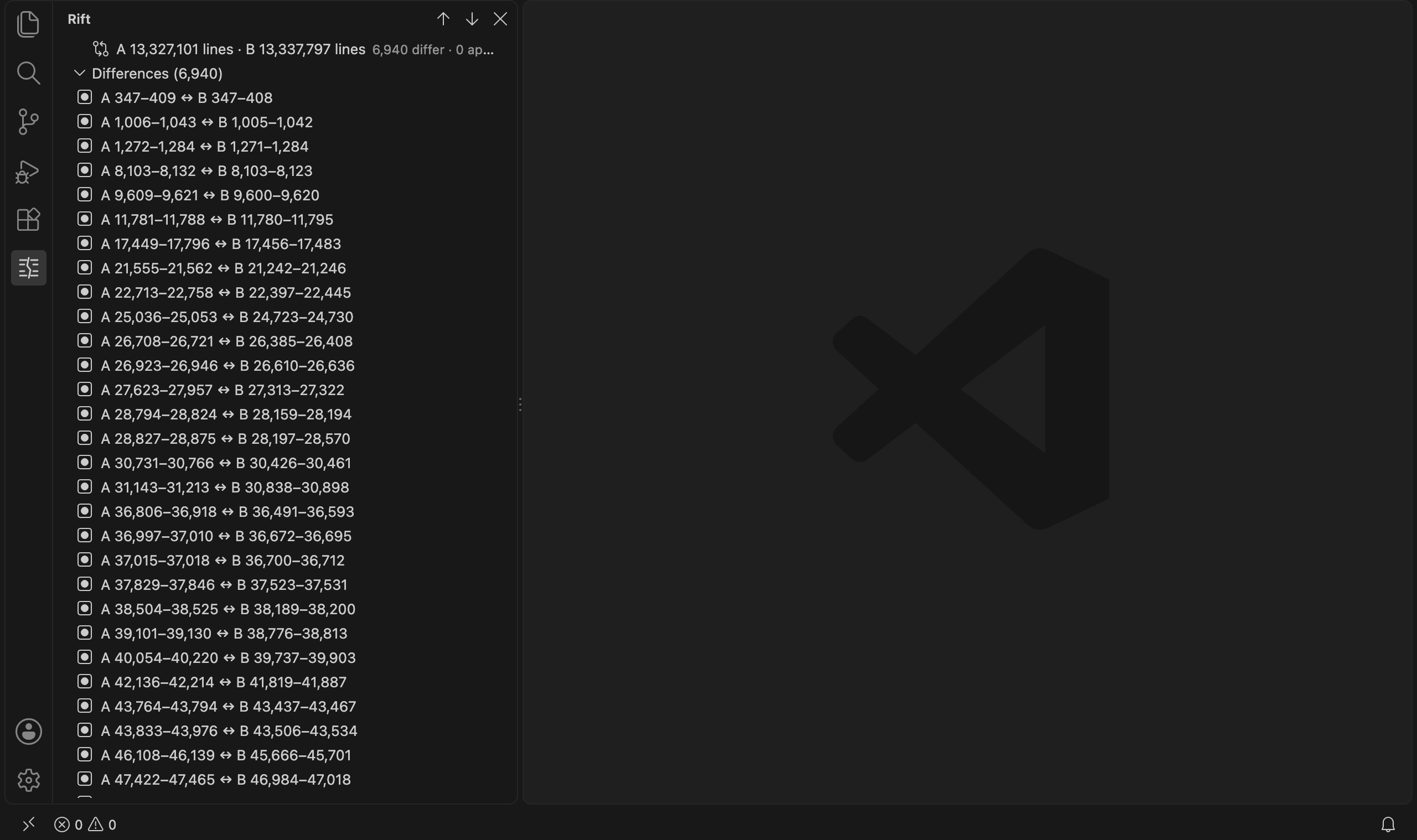
The first row is the summary. During the scan it reads Scanning… 42%. When the scan ends it shows the line counts of both files and, next to them, how many segments differ, how many are approximate, how many are equal, and how many blocks moved. Hover over it for the full paths, the sizes in bytes and the memory budget. Identical files get one row, Files are identical.
Differences lists the segments that differ, in file order, as line ranges: A 1,204,880–1,204,940 ↔ B 1,204,877–1,204,941. A range with no lines reads before 7, the line it sits before. The list loads 100 segments at a time; the last row, Load more… (100 of 807), fetches the next 100. The summary counts the equal segments, and the list leaves them out.
A segment marked approx, with a warning icon, is one Rift could not diff line by line within the budget. Rift marks it instead of guessing. Its excerpt still shows the real lines of both files.
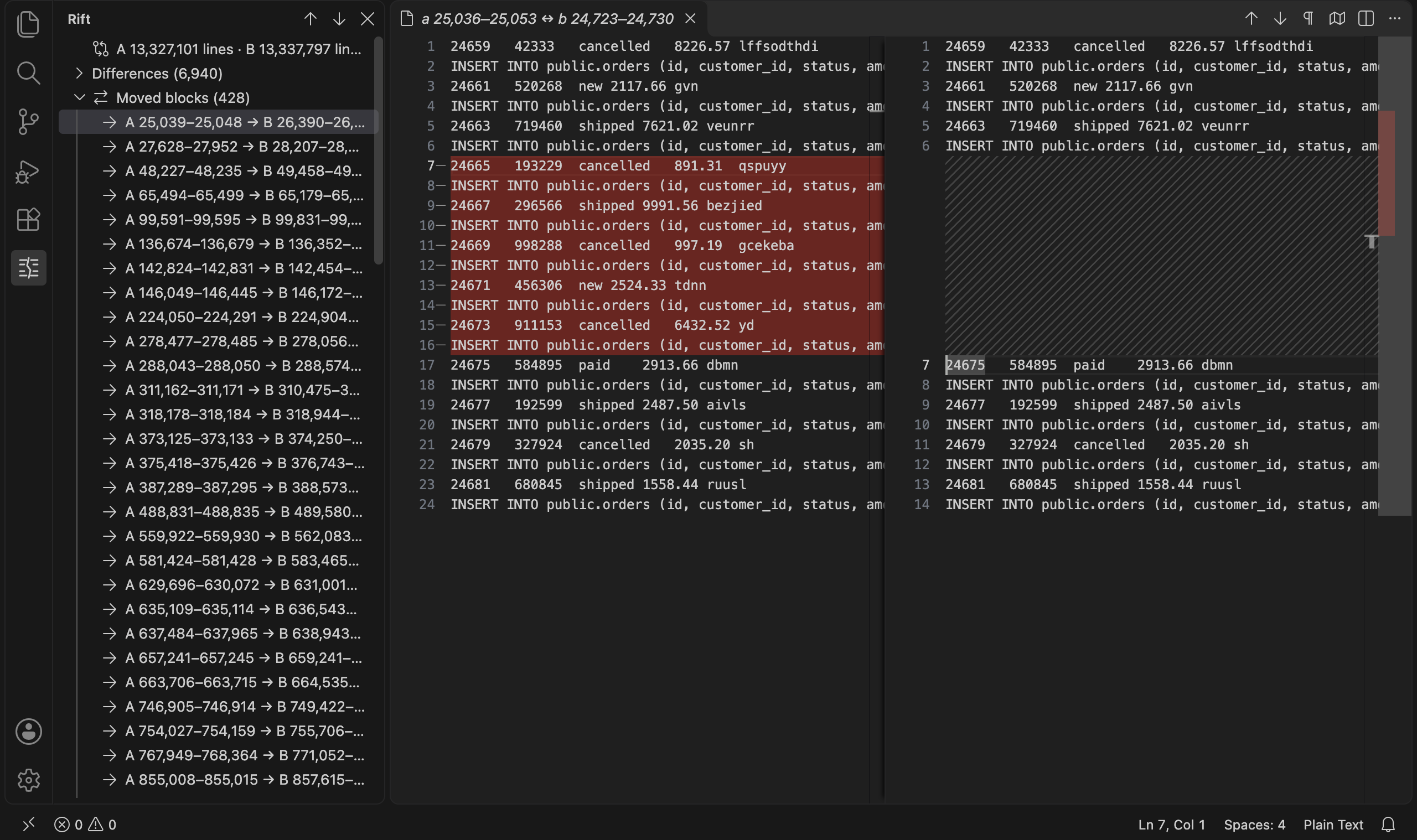
Moved blocks lists blocks of lines that sit in both files at different places, as A 10–14 → B 900–904 with the number of lines. A move does not change the diff; the group is a note on it. When the budget left no room to search for moves, the group reads Moved blocks (not searched), and its emptiness says nothing about the files.
Open a difference
Select a segment and VS Code's diff editor opens on that part of the two files: the segment's lines on both sides with rift.contextLines lines of context around them, 3 by default. The tab title gives the original line ranges, for example a.sql 1,204,880–1,204,940 ↔ b.sql 1,204,877–1,204,941, so you know where you are in a file the editor never opened. The diff is VS Code's own, with its highlighting, inline view and search.
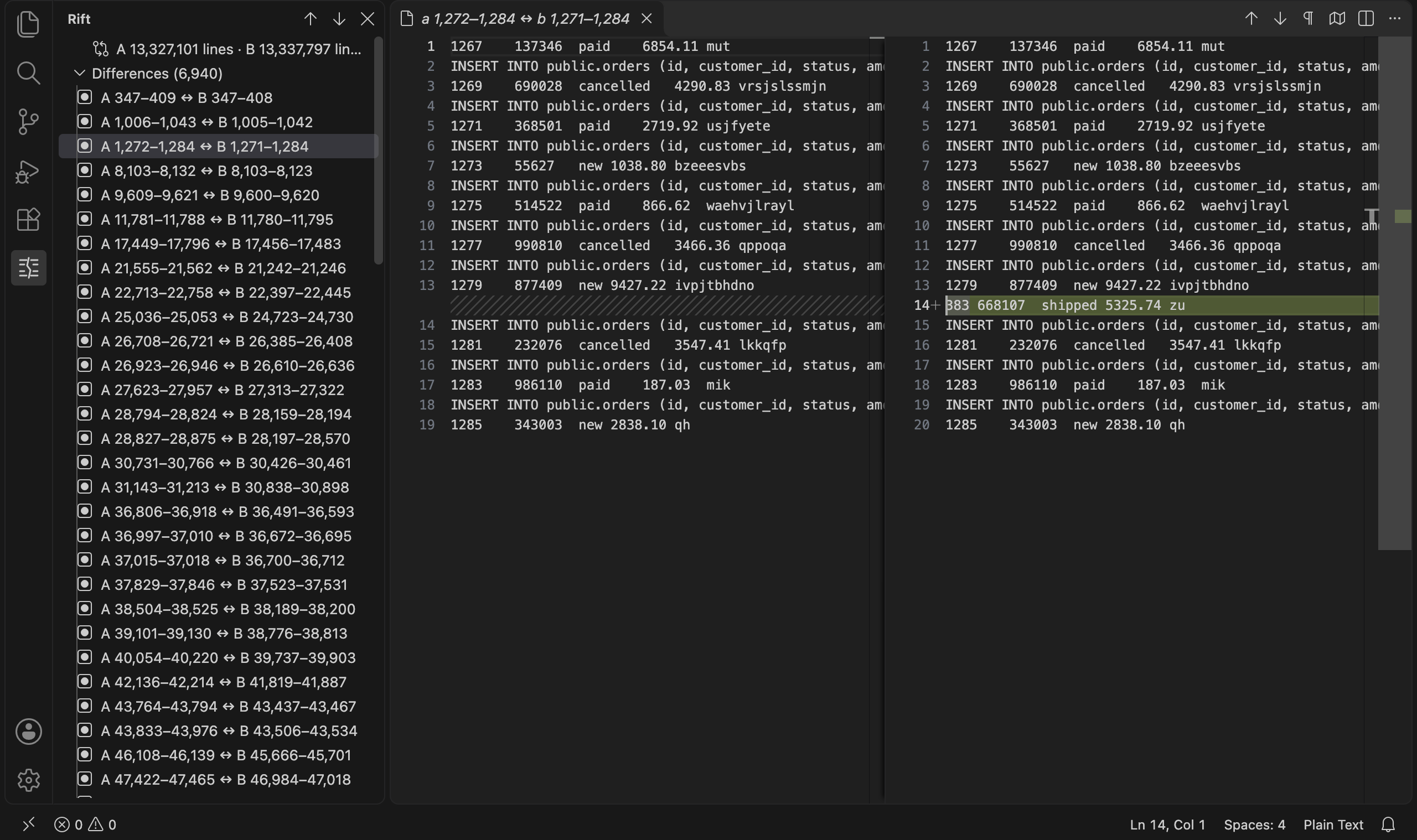
The two documents are read-only and hold only the excerpt. The editor picks the language from the file name, so a .sql excerpt gets SQL highlighting. Selecting a moved block opens the excerpt that holds the block's first line in A, with the cursor on that line.
Next, previous, go to line
| Command | Key |
|---|---|
| Rift: Next Difference | Ctrl+Alt+N |
| Rift: Previous Difference | Ctrl+Alt+P |
| Rift: Go to Line in File A… | Ctrl+Alt+G |
The keys work while a comparison is open, and Ctrl means the Control key on macOS too. The arrows at the top of the view run the first two.
Next and previous open the difference after or before the one you opened last, and select its row in the view. They load the next page of the list when they reach its end. Past the last difference the status bar says Rift: this is the last difference, and before the first, Rift: this is the first difference. After a moved block, they go on from the last difference before it.
Go to Line in File A asks for a line number of A, from 1 to its line count, and opens the segment that holds that line with the cursor on it. In an excerpt of A, the box starts at the line under your cursor, numbered as in the whole file.
The status bar
During the scan, the status bar shows Rift scan 42%. The scan reads both files twice, and the percentage counts both passes. After the scan, Rift refines the differing segments in the background, the ones you look at first, and the status bar shows Rift refine 120/807 until it is done. Hover over the item for the file names.
Settings
| Setting | Default | What it does |
|---|---|---|
rift.path | empty | The rift binary to run. Empty runs the one that ships with the extension. |
rift.mem | 256M | The heap budget of one comparison, written as for rift --mem: 64M, 1G, 300K or a number of bytes. |
rift.contextLines | 3 | Lines of context around a difference in the diff editor, 0 to 100. |
The server refuses a rift.mem over its limit of 1G per comparison. A new rift.mem applies to the next comparison you open, and a new rift.path when the server next starts.
When the scan runs out of memory
A scan that does not fit rift.mem fails with a message that names the budget, the half that refused and how many bytes it asked for. The view shows Scan failed, and both the view and the error message offer Rerun with --mem 16M.
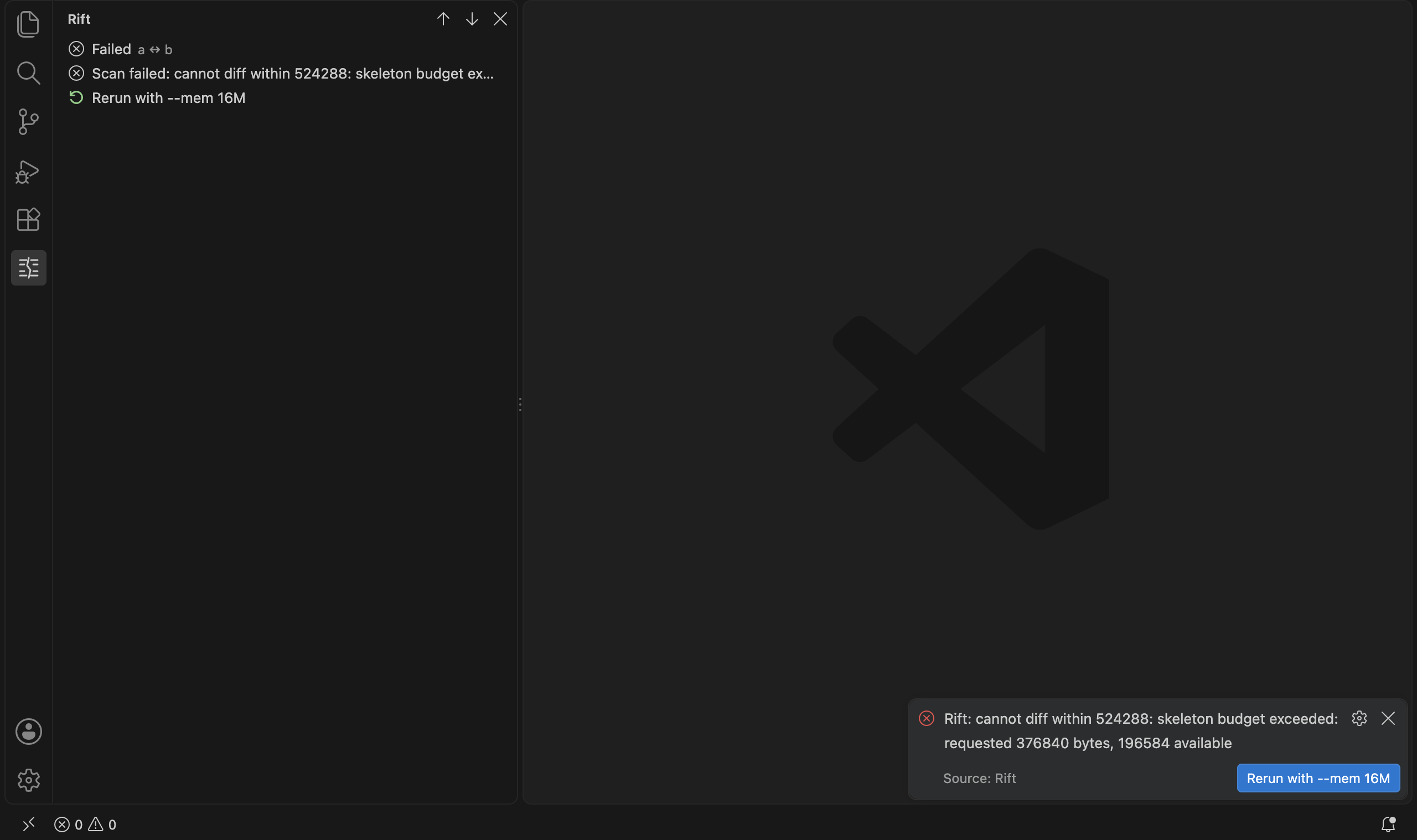
The offer starts from the server's advice, the number rift prints as rerun with --mem N. The extension adds 25% and rounds up to the next of 16M, 32M, 64M, 128M and so on, capped at the server's limit per comparison. An advice of 5120K becomes 16M, and one of 100M becomes 128M. The advice gets a run past the stage that failed, and a later stage can need more, so the extension pads it.
A rerun applies to that comparison only; rift.mem keeps its value. The extension offers the rerun twice. When the second rerun fails too, the offer turns into a link to the memory guide, so a pair that keeps failing does not loop. If the cap leaves no budget above the one that failed, the message names the server's limit and offers no rerun.
Troubleshooting
Rift: cannot start …. The extension found no binary to run: the path in rift.path is wrong, or your platform has no bundled binary. Set rift.path to a rift that has rift serve. A server that exits within two seconds of starting gets reported and stays stopped. One that dies later restarts and reopens the comparison.
A budget over the limit. The server refuses a rift.mem above 1G when you open the comparison. Lower it, or point rift.path at a script that runs rift serve --max-session-mem with a larger value.
Memory refusals. See the section above, and the memory guide for what the budget pays for. A larger file does not need a larger budget; a pair with many small differences can.
Cut and lossy lines. An excerpt shows at most 1,000 lines per side and 4,096 bytes per line, and fewer lines when long lines fill its share of the budget. A longer line ends in … [line cut, N bytes] with its full length, and a longer side ends in … [N more lines not shown]. Bytes that are not valid UTF-8 show as U+FFFD. The tab title adds cut, lossy lines or approx when they apply, and hovering over a marked line says why. The hover also names a CRLF terminator or a last line without one. Two lines that differ only in invalid bytes or in their line ends can look the same in the diff editor, and the hover tells them apart.